press releases and other resources that publish the analyst ratings principally through news
stories (provided by brokers, banks, and other financial organizations). We extract this
information through the use of proprietary NLP. We then store all of this information in a
database. These ratings typically contain the following data points (but sometimes vary):
● Name of the analyst
● Name of the organization where the analyst is employed
● Stock that is being rated
● The rating itself (for example, Market Outperform) - both the previous rating and the new
rating if it's being upgraded/downgraded
● The action (for example, downgraded/upgraded/reinstated etc)
● The upside/downside
● Date of the rating
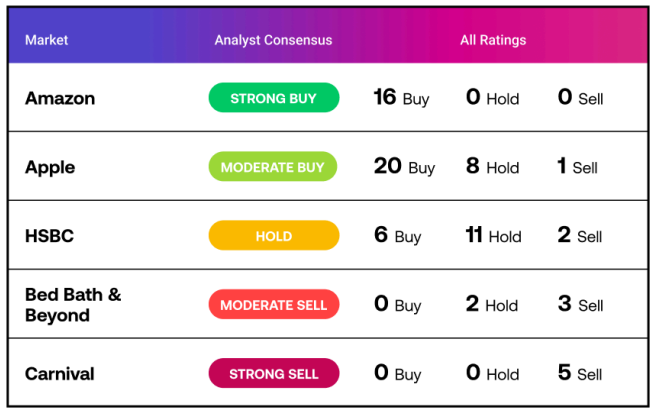
Having a large number of ratings with these data points allows us to aggregate them in the way
that you've seen in the design. For the ratings that we retrieve, we:
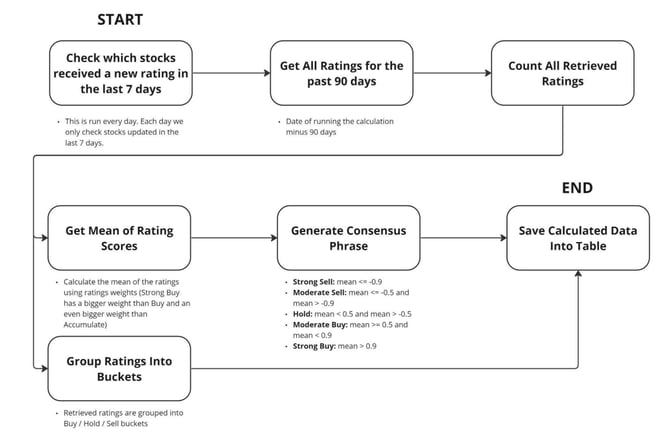
1. Check which stocks have received a new rating in a given week
2. Retrieve all the ratings for this stock for the past 3 months
3. Based on the ratings received, we group them into Sell/Hold/Buy "buckets", and based
on the mean of these ratings provide a consensus (e.g., Moderate Sell if there are a few
Sell and a few Hold ratings, a Strong Buy if there are predominantly Buy ratings etc).
Analyst Ratings Calculation Flow
API
Endpoint
● URL: https://api.acuitytrading.com/swagger/index.html
● Service Name: Asset
● Endpoint Name: POST /api/asset/analystratings
The ratings returned in this endpoint are refreshed on a daily basis and currently do not include
historical ratings.
Authentication
● Authentication Details: https://api.acuitytrading.com/Security
The Analyst Ratings endpoint supports the following parameters:
● AssetIds (array of integers) - the list of Acuity Asset IDs to retrieve the ratings for. If
omitted, ratings for all available assets will be returned.
● MinRatings (integer) - tells the API to return only records with higher ratings count than
specified number.
● Count (integer) - count of stocks to return
Request Samplecurl -L -X POST "https://api.acuitytrading.com/api/asset/analystratings" -H
"Content-Type: application/json" -H "Authorization: Bearer YOUR_BEARER_TOKEN" -d "{
\"MinRatings\": 10,
\"Count\": 10
}"
Response Sample
[
{
"AssetId": 113365,
"AssetName": "Singapore Exchange Ltd.",
"ConsensusPhrase": "ModerateBuy",
"BuyCount": 108,
"HoldCount": 55,
"SellCount": 6,
"CalculationDate": "2023-06-27T14:30:06"
},
{
"AssetId": 112891,
"AssetName": "Tesla Motors",
"ConsensusPhrase": "Hold",
"BuyCount": 19,
"HoldCount": 10,
"SellCount": 4,
"CalculationDate": "2023-06-27T14:30:06"
},
{
"AssetId": 90200,
"AssetName": "Chipotle Mexican Grill Inc.",
"ConsensusPhrase": "ModerateBuy",
"BuyCount": 14,
"HoldCount": 3,
"SellCount": 0,
"CalculationDate": "2023-06-27T14:30:05"
},
{
"AssetId": 87215,
"AssetName": "Albemarle Corp.",
"ConsensusPhrase": "ModerateBuy",
"BuyCount": 9,
"HoldCount": 3,
"SellCount": 0,
"CalculationDate": "2023-06-27T14:30:05"
},
{
"AssetId": 114956,
"AssetName": "Semtech Corp.",
"ConsensusPhrase": "StrongBuy",
"BuyCount": 9,
"HoldCount": 1,
"SellCount": 0,
"CalculationDate": "2023-06-27T14:30:06"
},
{
"AssetId": 83838,
"AssetName": "Barclays",
"ConsensusPhrase": "ModerateBuy",
"BuyCount": 7,
"HoldCount": 2,
"SellCount": 1,
"CalculationDate": "2023-06-27T14:30:05"
}
]
Response Schema
● AssetId (integer) - Acuity Asset ID that uniquely identifies the stock
● AssetName (string) - Name of the company that received the rating
● ConsensusPhrase (string) - The Analyst Consensus for a given stock. Can be one of
the following: StrongBuy, ModerateBuy, Hold, StrongSell, ModerateSell. The consensus
is calculated based on all Buy, Sell, or Hold ratings a company received in the last 90
days.
● BuyCount (integer) - Count of Buy ratings for a given company
● HoldCount (integer) - Count of Hold ratings for a given company
● SellCount (integer) - Count of Sell ratings for a given company
● CalculationDate (string) - Date of calculation
Result Display Example