
1. Background & Methodology
Corporate events are significant volatility catalysts for equity markets. The Acuity Corporate Calendar leverages proprietary news tagging and data synthesis to provide a "context-first" view of these events. Unlike one-dimensional competitors, our calendar helps traders understand not just when an event happens, but how the market is positioned and how it has historically reacted to similar prints.
2. Operational Guide: Main View
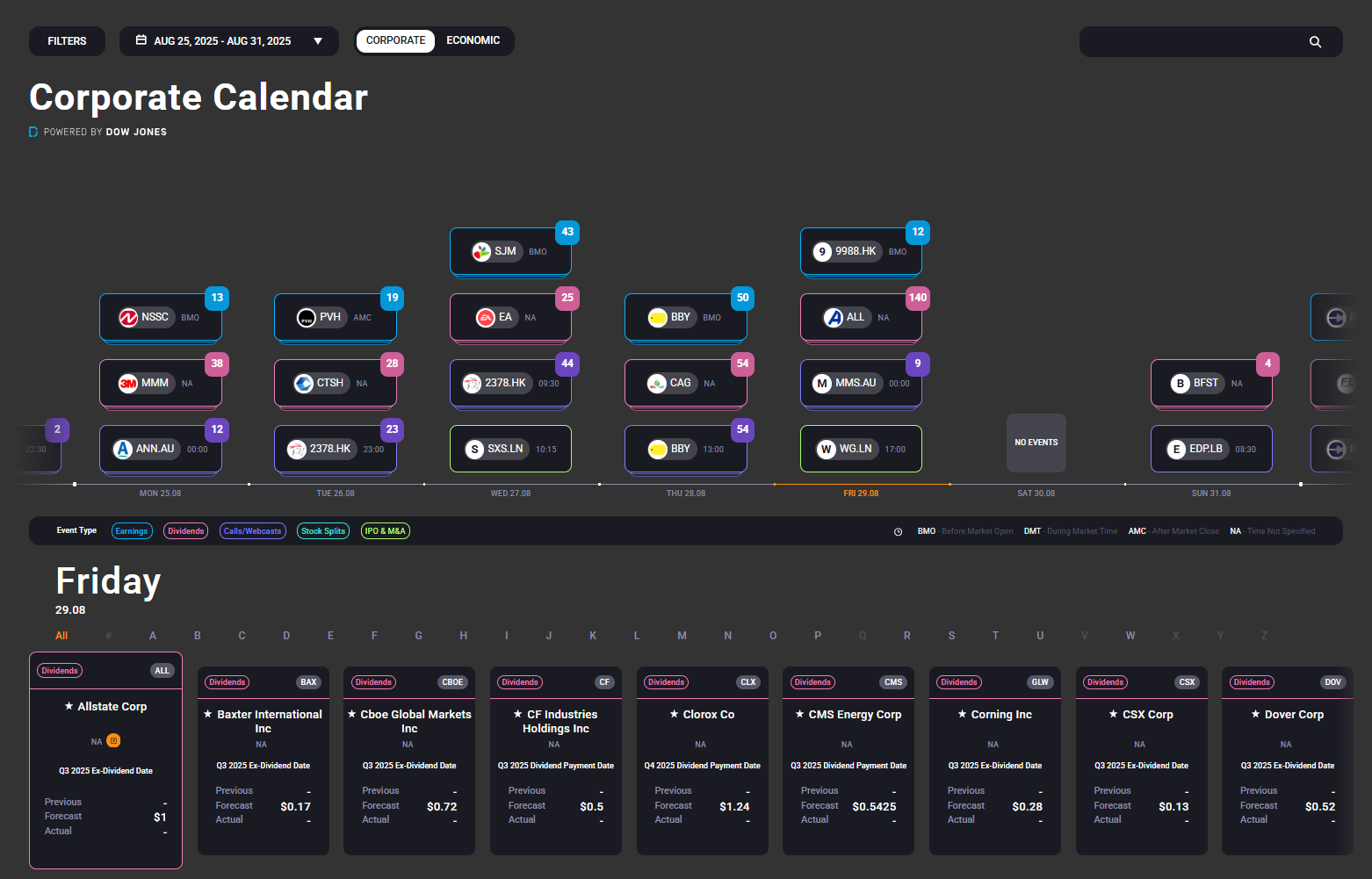
The main interface utilizes a timeline-based architecture similar to the Economic Calendar, allowing for rapid scanning of the corporate landscape.
Navigation & Discovery
-
Event Color-Coding: Day tiles are categorized by event type for instant visual recognition:
-
Earnings (Blue)
-
Dividends (Pink)
-
Calls/Webcasts (Purple)
-
Stock Splits (Turquoise)
-
IPOs and M&A (Green)
-
-
Impact & Volume: Each tile features a number in the top-right corner indicating the volume of events for that day.
-
Personal Calendar Sync: By clicking the Orange Square on any event tile, users can sync specific corporate releases to their personal virtual calendars (Google, Outlook, etc.) with automated reminders.
3. Detailed Event View (The Two-Section Analysis)
Clicking a tile opens a comprehensive deep-dive into the specific company and event.
Section 1: Event Overview & Earnings Intelligence
-
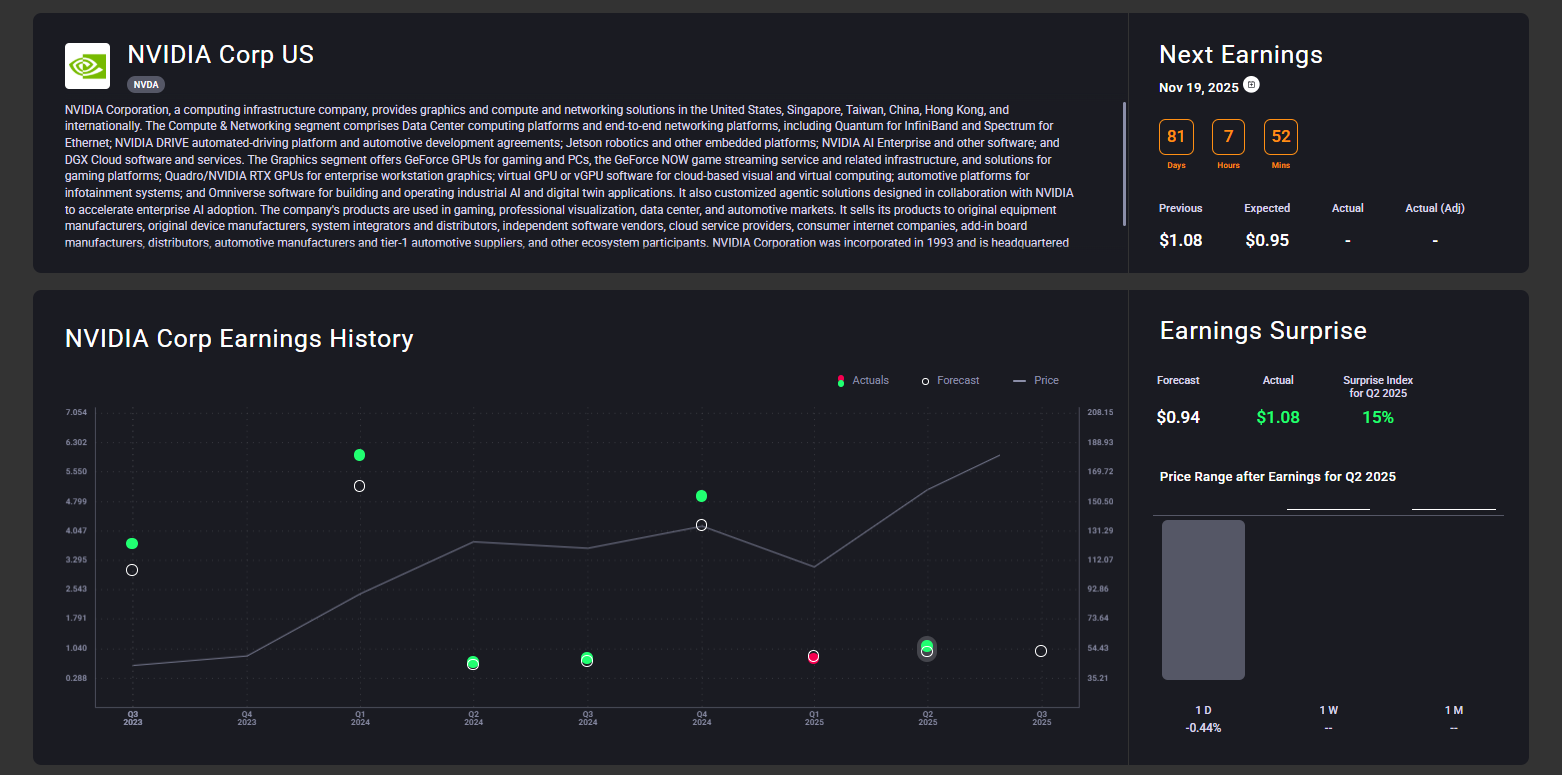
Company Profile: Located top-left, this provides a concise business activity description for fast context.
-
Next Earnings Module: A live countdown to the next earnings event. This module displays the Previous EPS (Earnings Per Share) and the Consensus Expected EPS for the upcoming print.
-
Trade Ideas: If a live and relevant idea from the Trade Intelligence pillar is associated with the asset, it will appear prominently above the history chart.
-
Earnings History Chart: A visual track record of the company versus "The Street."
-
Hollow Markers: Represent consensus analyst expectations.
-
Solid Markers: Represent Actual EPS (Green for a beat, Red for a miss).
-
-
Surprise & Price Reaction: Earnings Surprise: The percentage of the beat or miss relative to expectations.
-
Post-Event Performance: Displays the actual price move at 1D / 1W / 1M intervals following the latest result.
-
Historical Average: Before an event, this panel shows the average price reaction across the last 10 earnings events for the same time windows to help set volatility expectations.
-
Section 2: News & Sector Context
-
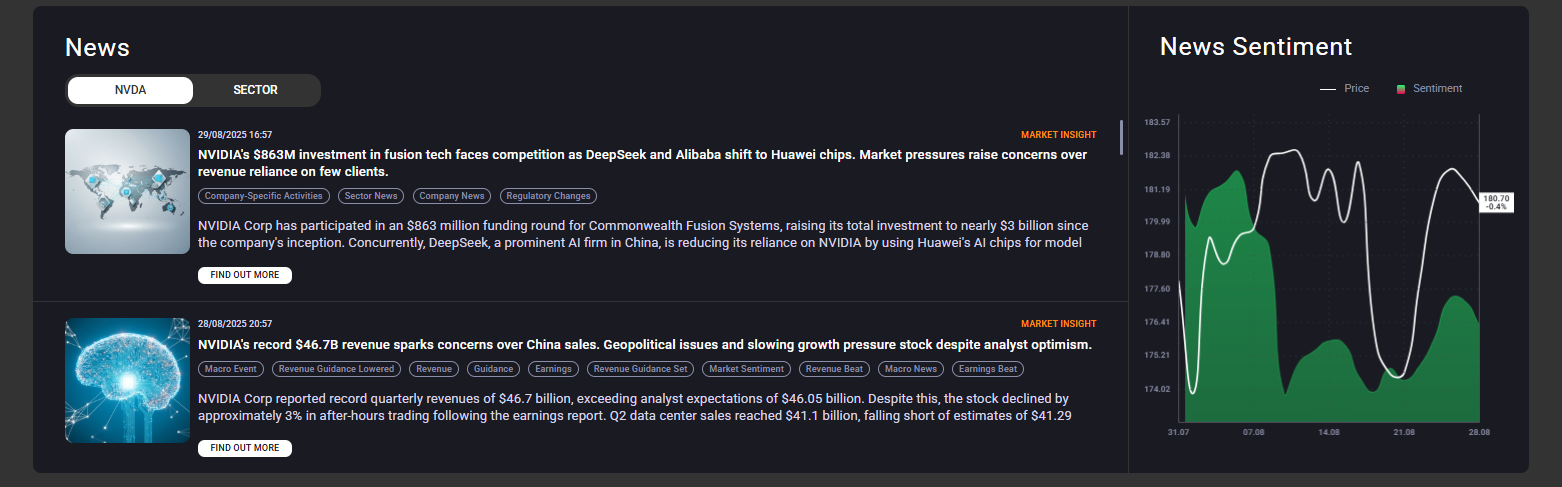
Company News Feed: A carded stream of updates specifically tagged to the company. Cards include headlines, summaries, and thumbnail images to improve scannability and click-through rates.
-
Sector News Tab: Allows traders to toggle to the broader sector view, helping them distinguish between company-specific (idiosyncratic) news and market-wide trends.
-
News Sentiment vs. Price Chart: An overlay chart comparing aggregate news sentiment (shaded green/red areas) against the price line (white).
-
Sentiment Volume: The height of the shaded area indicates news volume.
-
Divergence Alerts: If sentiment turns bullish while the price remains stagnant, it may signal an imminent price correction or an early entry edge.
-
4. Key Benefits for Brokers
The Corporate Calendar is designed as a high-value retention and conversion tool:
-
Increase Engagement: Pre-earnings alerts and volatility cues keep users active on the platform before and after the event.
-
Enhanced Content Strategy: Use real-time event data to power high-impact CRM, push notification, and email marketing campaigns.
-
Improved Conversion: Clear timing, historical impact data, and integrated "Click-to-Trade" CTAs convert passive observers into active traders.
5. Comparison: Acuity vs. Traditional Calendars
| Feature | Traditional Calendars | Acuity Corporate Calendar |
| Content Type | Passive event listings | Actionable data with integrated Trade Ideas |
| User Experience | "Dead-end" static text | Interactive layouts with CTA-enabled tools |
| Sentiment | No market tone context | Built-in news and sentiment overlays |
| Marketing | Low value for campaigns | Fully ready for CRM, social, and push integration |
| Insights | Basic event details | Volatility, expected ranges, and historical data |
6. Technical Specifications & Localisation
-
Asset Coverage: Comprehensive global coverage including Earnings, Dividends, Stock Splits, IPOs, and M&A.
-
Delivery Methods: Web Widgets, API, Dynamic Email, Telegram, Discord, and WhatsApp (3rd party).
-
Language Support: Available in 19 languages, including English, Russian, Korean, Japanese, Spanish, German, French, Arabic, and both Simplified and Traditional Chinese.
-
Real-Time Data: Post-event data (Actuals) update within seconds of the official company release.