
Overview
Articles in the Market Companion feed are matched with relevant Acuity forward-looking analysis:
- Analyst Ratings
- Trade Ideas
- Market Alert
These insights are displayed alongside the tiles in Top Moves Explained: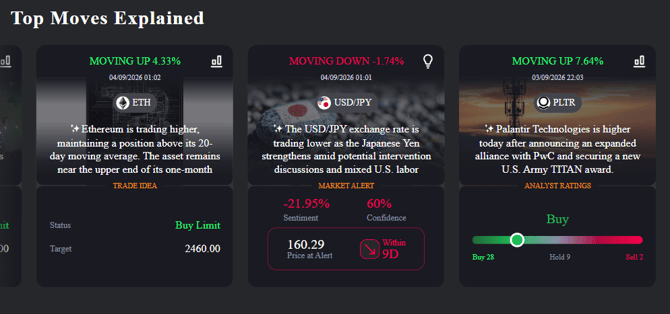
The result is that news and analytics sit on the same surface.
A trader reading that a stock has fallen on supply chain concerns can see immediately whether analyst price targets sit above or below the current level, or whether there is an active trade idea on the asset, without moving between tools.
What Can Appear Alongside an Article
Five datasets are eligible to be surfaced:
| Dataset | What it shows the trader |
|---|---|
| Analyst Ratings | The consensus view (Strong Buy through to Strong Sell), the distribution of analyst opinions, and high / mean / low price targets plotted against the current price |
| AI Trade Ideas | An algorithmically generated trade idea with direction and confidence level |
| Analyst (Human) Trade Ideas | A trade idea produced by an analyst |
| Pattern Trade Ideas | A trade idea produced by a technical chart pattern identified on the instrument |
| Market Alerts | A bullish or bearish alert on the asset, with its validity period |
One insight is shown per article - the one the scoring engine judges most relevant to that particular story.
How the Most Relevant Insight Is Chosen
Market Companion does not simply attach the newest or the strongest available signal. Each eligible insight is scored across four dimensions, and the highest-scoring candidate is the one displayed.
- Direction alignment — the most heavily weighted factor. The engine checks whether the insight agrees with the direction of the news. A bearish trade idea attached to a story about a falling stock is a strong match; a bullish signal attached to a bearish story is a contradiction and is heavily penalised.
- Confidence — how strong the signal is, drawn from the dataset itself. For analyst ratings, confidence is derived from the spread of opinion: a stock with a large number of Strong Buys and no Sells scores highly, while an evenly split consensus scores low.
- Time to expiry — whether the trader can realistically act on the signal. There is a sweet spot of roughly 12 hours to 2 weeks. A signal expiring within the hour and a signal that will not resolve for two months are both penalised; the middle band scores full marks.
- Freshness — measured proportionally rather than in absolute terms. Three days old means something different for a 7-day signal than for a 30-day signal, so the engine scores on how much of the signal's life has been consumed, not on raw age.
Worked Example
An article reports that a stock is moving down. Five candidate insights are available on that instrument:
| Candidate | Direction | Confidence | Expires in | Outcome |
|---|---|---|---|---|
| AI Trade Idea | Bearish | 80% | 15 days | Selected — correct direction, high confidence, actionable horizon |
| Analyst Trade Idea | Bearish | 40% | 5 hours | Correct direction, but low confidence and expiring too soon |
| Analyst Ratings | Bullish | 95% | 15 days | High confidence, but contradicts the direction of the story |
| Market Alert | Bullish | 60% | 5 days | Contradicts the direction of the story |
| Pattern Trade Idea | Bullish | 50% | 25 hours | Contradicts the direction of the story |
The AI Trade Idea wins because it is the only candidate combining a matching direction with high confidence, a usable time horizon, and good freshness. The Analyst Ratings entry carries the highest confidence of the five but points the opposite way to the news, so it is not shown — direction alignment outweighs raw confidence by design.
Signal Quality Filtering
Market Alerts are cross-checked against the asset's underlying sentiment momentum before they can be surfaced. If an alert is bullish while sentiment on that asset is actively declining, the alert is discarded rather than displayed. This removes a class of false positive that would otherwise appear alongside a contradicting story. The corresponding sentiment change figure is carried through in the data and displayed with the insight.
What the Trader Sees
- In the feed: a news tile with a sub-tile flagging the type of insight attached - trade idea, analyst rating, market alert, or performance data - along with headline values such as sentiment, confidence, price at alert, and the alert window.
- On opening the article: the story, followed by the supporting analysis beneath it with an interactive chart.
- Analyst Ratings view: a visual consensus gauge, the distribution of analyst opinions across Buy / Hold / Sell, and price target lines (maximum, average, minimum) drawn against the current price on the chart.
- Market Alerts view: the alert detail - start date, duration, direction, and confidence - with the validity period marked directly on the chart.
- Trade Ideas view: the signal detail with the relevant chart.
Charts are supported on both Acuity's native charting engine and TradingView. Layouts are responsive across mobile, tablet, and desktop. AI-generated articles continue to carry a visible AI indicator, and every tile displays a publication timestamp.
Entitlements
Forward-Looking Datasets respect each client's existing data permissions. Only datasets a trader is entitled to will ever be considered as candidates — if a trader is not entitled to Signal Centre, for example, no Signal Centre trade ideas will surface for them.
Where no permitted insight is available for an article, the article displays as a standard Market Companion story. Traders never see an empty or broken insight panel.
Coverage & Scope
| Item | Detail |
|---|---|
| Asset coverage | US Stocks and Popular CFDs |
| ETFs | Not currently supported |
| Insights per article | One highest-scoring eligible insight |
| Refresh behaviour | Insights are snapshotted at the moment of publication |
| Compatibility | Available within the Research Terminal suite and the standalone Market Companion Widget |
Frequently Asked Questions
1. What are Forward-Looking Datasets?
Every Market Companion articles are paired with the single most relevant piece of Acuity forward-looking analysis, shown underneath the story with an interactive chart. News and analytics in one place, instead of two tools.
2. What kinds of insight can appear?
Five: Analyst Ratings, AI Trade Ideas, Analyst (Human) Trade Ideas, Pattern Trade Ideas, and Market Alerts.
3. Why only one insight per article?
Because the aim is relevance, not volume. A scoring engine ranks every eligible candidate and shows the winner.
4. How is the winning insight chosen?
Four factors: whether the insight's direction agrees with the news (the heaviest weighting), signal confidence, time to expiry, and freshness. A high-confidence signal pointing the wrong way for that story will lose to a lower-confidence one that matches.
5. Why does the same article show the same insight?
The insight is snapshotted at the moment of publication and stays fixed. A story reviewed today shows exactly what it showed when published, which keeps it auditable and consistent.
6. Why can't my traders see trade ideas or analyst ratings?
Correct account permissions are required to see insights from Forward-Looking Datasets. Nothing changes for them beyond which datasets are eligible.
7. What happens if no insight is available?
The article displays as a standard Market Reader story. Clients never see a broken or empty panel.
8. Are weak signals filtered out?
Yes. Market Alerts in particular are now cross-checked against the asset's sentiment momentum - a bullish alert on an asset with declining sentiment is discarded rather than shown.
9. What's the coverage, and does this replace NewsIQ?
US Stocks and Popular CFDs; ETFs are a later phase. It doesn't replace NewsIQ - both currently coexist, and the Market Companion Widget is compatible with the Research Terminal suite.