
1. Assets to Watch: The Opportunity Filter
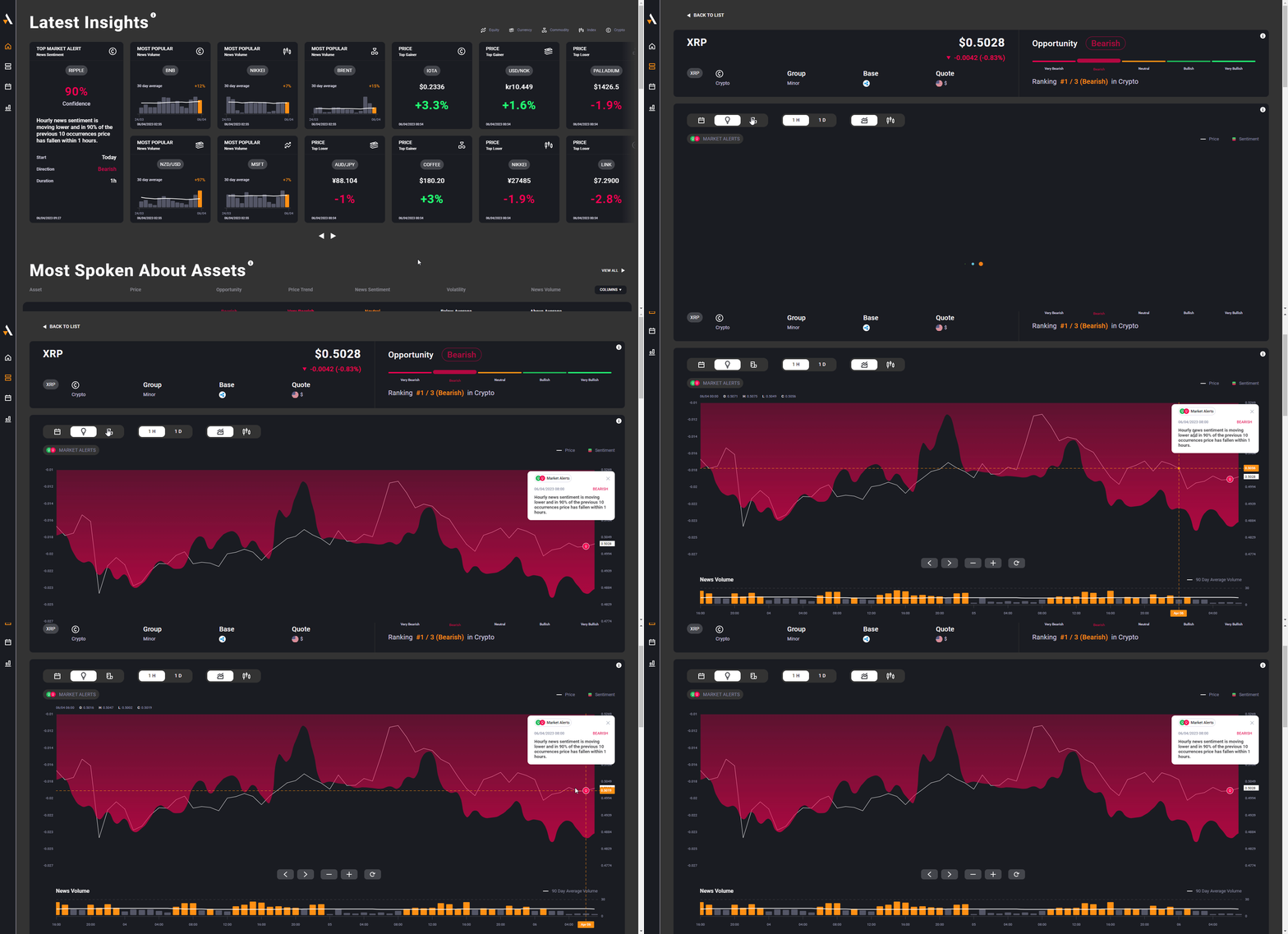
The "Assets to Watch" section is a high-density discovery tool. It emphasizes specific instruments that are currently flashing signals across different datasets, helping traders move past their usual watchlists to find new volatility.
Dynamic Filtering Options:
-
Most Volatile Assets: Displays the Top 10 instruments experiencing the highest volatility spikes relative to their average. This utilises Acuity’s proprietary Volatility Sentiment Score.
-
Most Spoken About Assets (RCV): Identifies the Top 10 instruments with the highest News Volume spike over their 90-day average. Using the Relative Change of Volume (RCV) metric, this highlights assets currently "in the spotlight."
-
Custom Assets List: Brokers can curate a specific list of "Promoted" or "Popular" instruments via the Widget Settings to showcase new offerings or liquid assets.

2. Latest Insights: The Intelligence Feed
The "Latest Insights" section highlights the "Best of" the Acuity engine, updating continuously throughout the day. It acts as a cross-pillar notification system for high-probability events.
Feature Breakdown:
-
Market Alerts (90%+ Confidence): Surfaces sentiment-driven signals with the highest probability. Clicking these tiles leads directly to the AssetIQ deep-dive.
-
News Volume Metrics: Scans major asset classes (FX, Indices, Crypto, etc.) and pushes out the single asset with the largest 14-day volume spike from each class.
-
High-Impact Economic Events: A 3-hour "Warning" window for high-impact macro data (e.g., GDP, PMI, Inflation).
-
High-Surprise Economic Events: Alerts specifically for releases that have significantly beat or missed expectations, acting as a catalyst for immediate volatility.
-
Anticipated Earnings (NASDAQ 100): Monitors high-profile earnings calls occurring within the next 24 hours.
-
High-Surprise Earnings: Automatically pushes out equities that have beat or missed EPS estimates by 50% or more, highlighting extreme opportunity or risk.
-
Hot Trade Ideas (85%+ Confidence): Aggregates the highest-conviction signals from the Trade Intelligence pillar (Signal Centre) for the current day.
-
Top Price Movers: Lists the Top 5 gainers and Top 5 losers across all asset classes, helping traders spot trends or potential corrections.
3. Coverage & Asset Mapping
The Research Terminal provides a window into the full Acuity universe, ensuring that no market movement goes unnoticed.
-
Asset Coverage: Currently covers approximately 3,500 assets across FX, Indices, Commodities, Cryptocurrencies, and Equities.
-
Real-Time Discovery: Brokers can access the full comprehensive list of supported instruments via the internal dashboard under the 'My Assets' section.
4. Configuration & Customisation
The Research Terminal is designed to be a native extension of the broker’s platform, fully adaptable to both brand identity and specific licensing requirements.
Modular Permissions
Brokers can choose which datasets are visible within the Terminal based on their specific permissions:
-
Signal Centre: Required for "Hot Trade Ideas."
-
Economic Calendar (Macro): Required for Economic Event insights.
-
Corporate Calendar: Required for Earnings insights.
Styling & Branding
As with all Acuity products, the Terminal is fully customizable via the Widget Settings in the Product Category:
-
UI/UX: Customizable fonts, background/foreground colours, and Bullish/Bearish indicators.
-
Watchlists: Custom ordering and instrument selection for the "Assets to Watch" module.
-
Navigation: Flexible "Deep-Linking" allows the terminal to point users to specific sub-pages within the broker's own portal.